Category: Uncategorized

  • Best Online HTML Editor: Top Picks Compared (2026)

    Writing a few lines of HTML shouldn’t require installing a full code editor, setting up a local server, or creating yet another account just to fix one broken tag. Yet that’s exactly what happens when all you need is to format a product description, test a layout, or clean up pasted text.

    The friction adds up fast, especially when you’re bouncing between browser tabs looking for something that works without a login wall or a monthly fee attached.

    A best online html editor solves that by letting you write, format, and preview HTML directly in your browser, no downloads or sign-ups required. This guide walks through the features that separate a solid editor from a clunky one, compares the top picks for developers, designers, students, writers, and freelancers, and shows you how to match a tool to your project. Tools Repository, a free collection of over 100 browser-based utilities, comes up here too as one option worth knowing about.

    Here’s what to look for before you commit to any tool.

    Key takeaways

    • An online html editor lets you write, format, and preview HTML in your browser, with no installs or accounts needed to get started.
    • Look for live preview sync, clean HTML5 output, and cross-browser support before trusting any editor with real project work.
    • Free WYSIWYG tools cover most everyday formatting needs, while embeddable frameworks like Froala fit custom app development instead.
    • Match the tool to your skill level, output needs, and privacy requirements, not just whatever shows up first in a search.
    • Start with a free, no-login tool for quick jobs, then scale up to a heavier platform only when a project genuinely demands it.

    Table of Contents

    What is an online html editor?

    An online html editor is a browser-based tool for writing, formatting, and previewing HTML code without installing any software on your device. It runs entirely inside a web browser, whether that’s Chrome, Firefox, Safari, or Edge, and works the same way on a Windows laptop, a Mac, or a Chromebook in a school computer lab. Unlike a desktop IDE, there’s nothing to download, configure, or update, you just open a tab and start typing.

    Research on generative AI tools for HTML development has examined how well modern editors and code generators support this workflow, showing that these tools generally fall into two types. WYSIWYG editors, short for what you see is what you get, show your content the way it will actually appear on a live page while you format it visually. Source code editors instead display raw HTML markup with syntax highlighting, built for people comfortable typing tags directly. Many modern tools blend both, letting you toggle between a visual view and the code sitting behind it.

    What features make an html editor worth using?

    A handful of features separate a genuinely useful online html editor from one you’ll abandon after five minutes. The best tools skip account creation entirely, sync your code and preview instantly, and hand back markup that’s actually valid HTML5 rather than a tangle of broken tags. Cross-browser support matters too, since your content might get viewed in Chrome one minute and Safari the next, on a laptop or a phone. And if you ever paste text from Microsoft Word or Google Docs, cleanup tools stop being a nice extra and become essential.

    • No signup or install required. The best editors are ready the second you open the page, with no email address, password, or download standing between you and the task in front of you.
    • Live preview with instant sync. Whether you’re editing the visual view or the raw code, changes should show up in both panels immediately, without a manual refresh or a page reload breaking your flow.
    • Clean HTML5 output. Editors built on trusted engines like TinyMCE automatically strip broken or unnecessary tags, so the markup you copy is standards-compliant and portable across platforms.
    • Cross-browser and mobile support. A tool that only behaves properly in one browser causes headaches down the line, so confirm it works consistently across Chrome, Firefox, Safari, Edge, and Opera.
    • HTML cleaning tools. Content pasted from Word or Google Docs often drags along invisible inline styles and redundant tags, and a good cleaning setting strips that clutter before it reaches your live site.

    Handy extras that save time

    Beyond core editing, the better tools throw in small utilities that quietly save time. A dummy text generator fills empty layouts with placeholder copy so you can test spacing before real content is ready. A built-in color picker, similar to jsColor, lets you grab a hex code and copy a ready-made CSS snippet in seconds. Find-and-replace tools handle bulk text swaps across a document, which beats manually hunting for every instance of a typo.

    Which online html editors are best right now?

    The best online html editor for you depends heavily on whether you’re formatting a blog post or embedding a rich text field inside a custom application. Free, no-login WYSIWYG tools cover most everyday formatting needs, from cleaning up pasted text to grabbing a quick CSS snippet. Full-featured HTML5 composers add cleaning settings and dummy text generators for agencies producing content at scale. Developer-focused frameworks like Froala go further still, plugging directly into React, Django, or WordPress projects that need a branded, embedded editing experience, an approach also explored in open-source projects like an open-source Python web design framework built as a responsive desktop IDE. Here’s how each category breaks down.

    Tools repository

    Tools Repository takes a different approach by bundling more than 100 free browser-based tools into one place, including formatters for HTML, JSON, and SQL alongside CSS generators and color utilities. Everything runs client-side, meaning nothing you paste into a formatter ever reaches a server, and there’s no login screen standing between you and the task at hand. For a quick HTML cleanup or a one-off CSS snippet, that’s often faster than opening a heavier editor.

    It works well as a companion to bigger platforms rather than a replacement for them. Developers already living in VS Code or GitHub, and designers working in Figma, can lean on it for the small, repetitive jobs that don’t justify opening a full application, like formatting a snippet before a code review or grabbing a color value for a mockup.

    Free standalone wysiwyg editors

    Free standalone WYSIWYG editors are built for people who need HTML output but have zero interest in writing tags by hand. You format text with a familiar toolbar, much like a word processor, then click a source or code view button to reveal the generated markup ready for copy and paste. These tools suit small business owners writing product descriptions, marketers building newsletters, and bloggers formatting a post without calling a developer.

    Full-featured HTML5 composers were often built by design agencies that got tired of juggling five separate tools for one job. They generate valid, standards-compliant markup through engines like TinyMCE, and bundle cleaning settings, dummy text generation, and color pickers into a single workspace. Because many only output body content rather than full head and body tags, they fit best when you’re dropping formatted content into an existing CMS template.

    Developer-focused frameworks like froala

    Developer-focused frameworks such as Froala are built to be embedded inside a product you’re already building, not used as a one-off tool, similar in spirit to component libraries documented in guides like getting started with an embeddable HTML editor for React and jQuery-based applications. Froala supports integration across 15 or more frameworks, including React, Django, WordPress, and CakePHP, backed by a plugin ecosystem covering tables, spell check, and media embeds. Pricing starts with a 30-day free trial, and paid plans run from $899 per year for the Professional tier up to $1,999 per year for Enterprise, with custom Architect pricing available for larger deployments.

    How do i choose the right editor for my needs?

    Matching a tool to your project starts with an honest look at your technical comfort level and what the output needs to look like. Non-developers formatting a blog post or product page should stick with a WYSIWYG editor and a source view, while anyone building a custom application needs an embeddable, framework-compatible option instead. Also consider whether you need full-page HTML with head and body tags, or just body content for an existing CMS template.

    Budget and privacy matter just as much as features. A free, no-login tool is plenty for occasional formatting and cleanup work, while a paid, developer-focused framework only earns its cost once you’re shipping a product that needs deep customization and dedicated support.

    If you handle sensitive client code, prioritize tools that process everything locally in your browser rather than sending it to a server.

    Task Best editor type
    Quick blog or email snippet Free WYSIWYG editor
    Learning HTML basics Simple browser editor with live preview
    CMS content without head or body tags Full-featured HTML5 composer
    Custom app needing embedded editing Developer framework like Froala
    Everyday formatting and cleanup Free multi-tool platform like Tools Repository

    The takeaway

    The best online html editor isn’t one single tool, it’s whichever one matches your skill level and the job in front of you. Casual formatting, quick fixes, and student projects call for free, no-login tools that get out of your way. Agencies producing content at scale benefit from full-featured HTML5 composers, while development teams building their own products need embeddable frameworks with real customization options.

    If you’re not sure where to start, begin small. Open a free tool like Tools Repository for your next quick formatting task, whether that’s cleaning pasted text or grabbing a CSS color snippet, and scale up to a heavier framework only once your project genuinely demands it. The simplest option that gets the job done is usually the right one.

    Frequently asked questions

    Online html editors raise a few common questions around privacy, offline use, and output format, especially for anyone new to browser-based tools. Below are quick answers to the questions readers ask most before picking a tool for their next project.

    Is it safe to paste sensitive code into an online html editor?

    Safety depends on the specific tool you’re using. Some editors process everything client-side in your browser, meaning your code never reaches a server, while others send data off for processing elsewhere. Check a tool’s privacy policy before pasting confidential or proprietary code.

    Can i use an online html editor without an internet connection?

    Most online editors need an internet connection to load the page and its scripts initially. A few may cache resources locally afterward, but offline use isn’t standard, so don’t count on editing HTML without a signal.

    Do online html editors work well on mobile devices?

    Top editors use responsive design, so they display and function properly on tablets and phones. That said, typing and editing raw code on a small touchscreen keyboard is still awkward, so mobile use fits quick edits better than long sessions.

    What’s the difference between body-only html and full-page html?

    Full-page HTML includes the complete document structure, head tags, meta information, and body content, ready to stand alone as a webpage. Body-only output skips that wrapper and is meant for pasting into an existing CMS template or content block.

    Are free online html editors good enough for professional work?

    Yes, for most everyday formatting, cleanup, and content tasks, free tools handle professional work just fine. Reserve paid, developer-focused frameworks for situations where you’re building a custom application needing deep integration, branded theming, or dedicated support.

    How do i clean up messy html copied from word?

    Look for an editor with built-in HTML cleaning settings, often tucked behind a gear icon in the toolbar. These let you strip inline styles, redundant tags, and other leftover formatting that Microsoft Word or Google Docs add automatically when you paste content.

  • How to Protect Privacy Online: A Practical Guide

    How to Protect Privacy Online: A Practical Guide

    Every time you browse a website, order coffee through an app, or scroll through social media, you leave behind small pieces of personal data. Over time, those pieces get pulled together into a startlingly complete profile of who you are, where you live, and what you buy. That’s the core problem behind wanting to know how to protect privacy online: your data spreads faster than most people realize, and once it’s out there, pulling it back is nearly impossible.

    Advertisers, data brokers, and sometimes hackers use browsing history, app permissions, and social posts to build profiles that fuel ads, sell your information, or expose you to fraud.

    Protecting your privacy online means taking deliberate control over what you share, who can access it, and how it gets used. This guide walks through practical, no-nonsense steps, from tightening password habits to choosing privacy-first tools, so you can lower your exposure without turning into a full-time security expert. Read on, and you’ll find changes you can start making today.

    Key takeaways

    A few habits do most of the heavy lifting when it comes to protecting yourself online, and they’re worth keeping close at hand as you read the rest of this guide.

    • Share less on social media and lock down your privacy settings so old defaults aren’t leaving you exposed.
    • Use strong, unique passwords along with two-factor authentication on every account that offers it.
    • Encrypt sensitive files and use a VPN, or virtual private network, whenever you connect to public Wi-Fi.
    • Cut back on tracking by declining cookies, disabling ad personalization, and trying a private search engine.
    • Choose privacy-first tools that process your work locally instead of storing or tracking what you type.

    Table of Contents

    What information do you share without realizing it?

    Infographic showing hidden ways data is tracked online

    You share more personal data online than you probably realize, mostly through invisible tracking rather than anything you post on purpose, which is why researchers have begun developing ethical guidelines for geoprivacy to govern how location and identity data are collected and handled responsibly. Every website visit, product search, and app login quietly builds a digital trail through cookies, tracking pixels, and device fingerprinting, a technique that identifies your device by its unique settings rather than a stored file. Advertisers piece these signals together to figure out your habits, your location, and even your income bracket, then use that profile to target you with ads. Before you can protect your privacy online, it helps to see just how much you’re already exposing without a single deliberate click.

    The risks go beyond annoying pop-ups. Data broker sites, sometimes called people search sites, buy and resell your name, address, and phone number to anyone willing to pay for it. In one widely reported case, a credit card company alerted a customer that his name, email, and driver’s license number had surfaced on the dark web, a hidden corner of the internet used for illegal trading, months before he noticed anything was wrong. That gap between exposure and discovery is exactly why proactive habits matter more than cleanup after the fact.

    How can you limit what you share online?

    Infographic of habits to reduce oversharing online

    You can limit what you share online by treating every optional field, tag, and post as a choice instead of a formality, echoing guidance such as the official tips for protecting personal information published by Canada’s privacy regulator. Before posting a vacation photo or filling out a giveaway form, ask whether that detail is necessary or just convenient to hand over. Small habits, repeated across dozens of sites and apps, add up to a much smaller footprint over time, and they’re some of the fastest ways to protect your privacy online without buying a single tool.

    A few adjustments make the biggest difference for the least effort, and most take only a minute to set up.

    • Skip optional fields on forms. Leave your phone number or middle name blank unless a business genuinely needs it to complete your order.
    • Use a secondary email address for newsletters and one-off sign-ups, keeping your main inbox off data broker mailing lists.
    • Protect your home Wi-Fi password carefully, since your router carries financial and account details for every connected device in your house.
    • Watch what you “like” publicly. Even private accounts can have interactions surface in search results and hint at your identity or location.

    How do you strengthen your logins and account security?

    Infographic on strengthening login and account security

    You strengthen your login security by closing the two biggest doors attackers use: weak passwords and single-factor logins. A strong password mixes upper and lower case letters, numbers, and symbols, and avoids anything guessable like a birthday or a pet’s name. Since remembering dozens of unique passwords isn’t realistic for anyone, a password manager generates and stores them for you, so you never have to reuse one across accounts. This is a core part of how to protect your privacy online, because accounts, not just browsers, are the entry point attackers target most.

    Two-factor authentication adds a second checkpoint that a stolen password alone can’t get past. Combine that with limiting how you log into other sites, and account takeovers become far harder to pull off.

    • Turn on two-factor authentication wherever it’s offered, so a code sent to your phone or app backs up your password.
    • Avoid using one account, like Facebook or Google, to sign into several other services, since one breach then unlocks all of them.
    • Review connected apps every few months and disconnect anything you no longer recognize or actually use.

    How do you cut down on tracking and ads?

    Cutting down on tracking starts with controlling the tools that follow you across sites: cookies, ad identifiers, and stored search history. Search engines like Google and Bing keep years of queries by default, but dashboards such as Google’s “My Activity” let you review and delete that history in a few clicks, a practice detailed in Google’s own privacy policy explaining what data it collects and why. If managing settings constantly sounds tedious, switching your default search engine to a privacy-focused option such as DuckDuckGo avoids the profiling altogether, since it doesn’t log searches or build advertising profiles from your activity.

    Advertising settings deserve the same attention as your search history. Decline non-essential cookies whenever a site offers the choice, and turn off ad personalization inside major platforms like Google, Apple, Facebook, and Amazon, since these companies run some of the largest tracking networks on the internet. On your phone, disable cross-app tracking in the privacy settings so apps can’t quietly pass your activity to advertisers behind the scenes.

    What tools actually protect your data while you work online?

    Infographic comparing typical tools versus privacy-first tools

    The tools that actually protect your data are the ones that keep processing on your own device instead of sending it to a server. Encryption, which scrambles your data into unreadable code until the right key unlocks it, keeps files, texts, and emails safe if a device is lost or stolen. A VPN masks your IP address and encrypts your traffic, which matters most on public Wi-Fi at coffee shops or airports, where anyone nearby can intercept unprotected data. Before entering personal information into any website, check for the padlock icon and an “https” address, both signs the connection is encrypted.

    Everyday utility sites add another layer worth thinking about, since many quietly log the text, code, or files you paste into them. Tools Repository, a free hub of browser-based utilities for developers, designers, and writers, takes a different approach. Its 100-plus tools for formatting text, converting data, and generating CSS all run locally in your browser, with no login, no tracking, and nothing stored on a server, making it a practical stand-in for the single-use sites people often turn to for quick daily tasks.

    Typical free online tool Tools Repository
    Often requires an account or email signup No login required, ever
    May log or cache pasted text and files Processes everything locally in your browser
    Relies on ad tracking and cookies for revenue No tracking and no ads following you across sites
    One tool per site, multiple tabs and accounts 100+ tools in one clean, free interface

    Wrapping up

    Person securing laptop connection on public Wi-Fi

    Protecting your privacy online isn’t a single project you finish and forget; it’s a habit you keep building as new apps, devices, and services enter your life. Strong passwords, careful sharing, and a VPN on public networks each close off a different way your data can leak, and together they add up to real, lasting protection rather than a false sense of security.

    Start small if this list feels long. Pick one or two changes this week, maybe turning on two-factor authentication or switching to a privacy-first search engine, then build from there. Reaching for browser-based tools like the ones from Tools Repository for everyday formatting and conversion tasks is one more easy way to keep your data off servers you don’t control, and every habit like it moves you closer to genuinely private browsing.

    Privacy online rarely fails all at once. It erodes one small, convenient shortcut at a time, so the fix is just as gradual: one closed door after another.

    Frequently asked questions

    Is it possible to be completely anonymous online?

    Complete anonymity online is nearly impossible, since networks and payment systems always leave some trace behind. Combining a VPN, encryption, and minimal sharing gets you remarkably close to invisible for everyday purposes, even though a determined investigator with enough resources could still piece together fragments of your activity.

    How often should I update my privacy settings?

    Check your privacy settings at least once every three months, since platforms often reset defaults after updates roll out. Also review them right after any major app or operating system update, as new features sometimes introduce fresh tracking permissions you never agreed to.

    Are free VPNs safe to use?

    Not always. Some free VPNs cover their costs by logging and selling your browsing data, which is the opposite of what you’re trying to avoid. Before choosing one, read its privacy policy, check independent reviews, and confirm it states clearly that it keeps no activity logs.

    Can deleting an app remove all my data from it?

    Deleting an app removes it from your device, but copies of your data often remain on the company’s servers afterward. To fully remove your information, visit the app’s privacy settings or contact support directly and request account and data deletion in writing.

    What should I do if I think stalkerware is on my phone?

    Watch for warning signs like unexplained battery drain, unfamiliar apps, or unusual data usage, all of which can point to hidden monitoring software. Before removing anything, contact a domestic-safety or anti-stalking organization for guidance, since abruptly deleting stalkerware can alert the person monitoring your device.

    Does a browser-based tool like Tools Repository store my data?

    No, it processes everything client-side inside your browser, so text, code, or files you paste never reach a server. There’s no login, no tracking, and nothing saved afterward, which makes it a safer choice for everyday tasks like formatting text or converting data.

  • What Is a Random Number Generator? Full Guide

    What Is a Random Number Generator? Full Guide

    Picking a genuinely fair number is harder than it sounds. Ask a room full of people to call out a number between 1 and 100, and you’ll spot patterns almost right away, because human brains are bad at faking chance. Certain numbers get picked over and over, while others barely get a mention. Whether you’re building a game, drawing a raffle winner, or generating a password, you need an unbiased pick, not a coin flip filtered through unconscious bias.

    So what is a random number generator, exactly? It’s a hardware device or software program that outputs numbers with no predictable pattern, drawn from a range you set in advance. This guide breaks down how these generators actually work, walks through the two main types you’ll run into (pseudo-random and true random), and shows where each one gets used, from web development test data to official lottery drawings. You’ll also get a side-by-side comparison of the two types, along with where to find free, no-login tools for everyday number generation. Read on to see which one fits your next project.

    Key takeaways

    • A random number generator produces unpredictable results pulled from a range or set you define in advance.
    • There are two main types, pseudo-random (PRNG) and true random (TRNG), and each fits a different job.
    • PRNGs run on a mathematical formula and a seed value, making them fast and perfectly fine for games, testing, and casual use.
    • TRNGs pull randomness from physical noise, like atmospheric static, which makes them the right choice for security and cryptography.
    • Free browser-based tools put both approaches a click away, with no software to install and no account needed.

    Table of Contents

    What is a random number generator?

    A random number generator is a hardware device or software algorithm that outputs values with no pattern anyone could use to predict the next one. It works by selecting a result from a range you define, such as an integer between 1 and 1000, and returning it right away. Each result is meant to be independent, so the last number produced has no effect on the next one.

    How values spread across that range depends on the setup behind the tool. Most general-purpose generators spread results evenly, giving every number in the range equal odds of being picked. Some specialized tools follow a bell-curve pattern instead, similar to human height, where results cluster near the average and few sit at the extremes. Knowing which distribution applies helps you choose the right generator for a survey, game, or statistics project.

    What are the two main types of random number generators?

    Infographic comparing pseudo-random and true random generator types

    Every random number generator falls into one of two categories, pseudo-random or true random, and the difference comes down to where the unpredictability actually starts. A pseudo-random generator, or PRNG, relies on a mathematical formula and a starting value called a seed to produce a sequence that only looks random. A true random generator, or TRNG, instead measures real-world physical noise, so its output can’t be reproduced or reverse-engineered even by someone who fully understands the system. Choosing between the two matters most once security enters the picture, since a predictable algorithm is a genuine risk in cryptography, passwords, or authentication tokens, while a TRNG removes that risk almost entirely.

    Pseudo-random number generators (PRNGs)

    A pseudo-random generator starts with a seed, a starting number fed into a deterministic formula. Recent research into GAN-based pseudo random number generation optimized through genetic algorithms shows how machine learning techniques are being explored to improve the statistical quality of these formula-driven sequences. Feed the same seed into the same PRNG twice, and you get the identical sequence both times. This makes PRNGs fast, cheap to run, and the default engine behind games, list shuffling, quizzes, and sample test data.

    The catch is that a predictable formula is, well, predictable. If someone figures out the seed and the algorithm, they could guess future outputs, which is a real problem for passwords, encryption keys, or login tokens. That’s why security-sensitive tasks call for a cryptographically secure pseudo-random number generator, or CSPRNG, a hardened variant built to resist exactly that kind of guesswork.

    True random number generators (TRNGs)

    A true random generator pulls its randomness from unpredictable physical events instead of a math formula. Common sources include atmospheric noise (natural radio static from things like lightning), thermal noise from electron activity inside a conductor, and other quantum-level effects that no equation can foresee. RANDOM.ORG, running since 1998 and built by Professor Mads Haahr at Trinity College Dublin, is a well-known example that generates true randomness by capturing atmospheric noise.

    Because these physical processes aren’t governed by a repeatable rule, their output can’t be reverse-engineered, even by someone who knows exactly how the system works. This is why TRNGs are the standard choice for generating seed tokens, encryption keys, and other high-stakes security values where genuine unpredictability outweighs raw speed.

    Pseudo-random vs. true random, what’s the difference?

    Comparison chart of pseudo-random versus true random generators

    The clearest way to see how pseudo-random and true random generators differ is to line them up side by side. Speed, security, and the source of randomness all shift depending on which type you’re using, and that shift decides which tasks each one suits best.

    Aspect Pseudo-random (PRNG) True random (TRNG)
    Source Math formula and seed Physical noise, atmospheric, thermal, quantum
    Predictability Same seed, same sequence Can’t be reproduced
    Speed Very fast Often slower, needs a noise source
    Best for Games, testing, casual tasks Security keys, lotteries, research

    Hardware-based approaches, such as a multi-memory approach for random number generators implemented in FPGA systems, illustrate how engineers balance speed and randomness quality when PRNGs alone aren’t sufficient. Once real money, personal data, or public trust enters the picture, though, a TRNG or a CSPRNG becomes the safer call.

    How are random number generators used in real life?

    Infographic of real-life applications of random number generators

    Random number generators show up across a wide range of industries, often working quietly behind the scenes:

    • Video games use them to decide loot drops and enemy behavior.
    • Lotteries and raffle drawings depend on them to pick winners without any hint of favoritism.
    • Security systems lean on true random generators to build encryption keys and authentication tokens.
    • Researchers use them for random sampling and simulations like Monte Carlo modeling, where unbiased inputs matter for accurate results.

    Plenty of everyday tasks rely on the same idea, just at a smaller scale:

    • Developers generate random passwords, hexadecimal color codes, and unique IDs for their projects.
    • Teachers use them to draw names for classroom activities.
    • Content writers randomize quiz questions or shuffle a list of items.
    • Even picking a random meeting time or a set of geographic coordinates runs on the same underlying principle, an unpredictable pick from a defined range.

    Where can I find free random number generator tools?

    Person using free online random number generator on laptop

    Most everyday needs, like shuffling a list, generating a random password, or picking a quick lottery-style number, don’t call for specialized hardware or a paid subscription. A solid browser-based PRNG handles the vast majority of these tasks instantly, without you needing to write a line of code or install anything on your machine.

    Tools Repository is a free, browser-based hub built around exactly this need, with more than 100 utilities covering generators, converters, formatters, and design helpers in one clean interface. There’s no login step, no account data collected, and no activity tracking tied to a profile, so students, freelancers, and small teams can generate a random value or shuffle a list and get back to work.

    The takeaway

    Hand rolling dice illustrating chance and randomness

    A random number generator exists to strip out human bias and hand you a genuinely unpredictable result, whether that’s a pseudo-random pick for a game or a true random value for an encryption key. The type you choose should always match the stakes of the task. Casual randomization, like shuffling a playlist or picking a raffle name for a low-key giveaway, works fine with a standard PRNG, while anything touching security, money, or public trust calls for a TRNG or a CSPRNG instead.

    Once you know which type fits your project, the last step is finding a tool that respects your time and your data. Free, privacy-first platforms like Tools Repository make that easy, putting random number generation and dozens of other everyday utilities a click away, with no sign-up and no tracking required.

    Frequently asked questions

    Here are quick, direct answers to the questions people ask most about how random number generators work and where they’re safe to use.

    Is Math.random() in JavaScript a true random number generator?

    No, Math.random() is a pseudo-random number generator built into JavaScript, not a true random source, similar in concept to Python’s built-in module for generating pseudo-random numbers used for non-security tasks. It runs on a deterministic algorithm, so it isn’t cryptographically secure. Avoid it for passwords or encryption keys, and use the Web Crypto API’s getRandomValues() instead for anything security-related.

    Can a random number generator repeat the same number twice?

    Yes, repeats are normal in most random number generators, since each result is independent of the last one. Rolling the same number twice in a row isn’t a bug, it’s expected behavior. If you need unique values only, look for a tool with a duplicate-exclusion option.

    Are online random number generators safe to use for passwords?

    Only if the tool uses a cryptographically secure pseudo-random generator or a true random source behind the scenes. Standard PRNGs are fine for games but predictable enough to pose a real risk for passwords. Check that a password generator specifically states it’s built for security use first.

    Why do lotteries use true random number generators instead of software?

    Lotteries need results the public can trust as fair and impossible to manipulate. A standard PRNG could theoretically be reverse-engineered if someone learned the seed and algorithm, opening the door to fraud accusations. True random generators remove that risk since their output can’t be reproduced or predicted.

    What is a seed in a random number generator?

    A seed is the starting value fed into a pseudo-random generator’s formula, a concept implemented directly in tools like NumPy’s random sampling module used widely in scientific computing. It determines the entire sequence of numbers the algorithm produces from that point on. The same seed and algorithm combination always generates the exact same sequence, which is why seeds must stay secret in security-sensitive applications.

    Can humans generate truly random numbers on their own?

    Not reliably. People tend to avoid repeating digits, favor certain lucky numbers, and unconsciously fall into patterns when asked to pick something at random. This tendency is well documented, which is exactly why random number generators, not gut instinct, get used for fair drawings and unbiased sampling.

  • Online XML to JSON Converter: Fast, Free & Private

    Online XML to JSON Converter: Fast, Free & Private

    Rewriting a chunk of XML by hand into JSON is slow, fiddly, and not how anyone wants to spend an afternoon. Whether you’re pulling data from an old SOAP API, a CMS export, or a vendor’s product feed, retyping every tag into a key-value pair invites typos and broken structures fast.

    An online XML to JSON converter handles this instantly, turning elements, attributes, and nested tags into clean JSON without a single line of code. This article walks through what these converters actually do, why JSON has become the default format for APIs and JavaScript, the mapping rules that decide how your data comes out the other side, and the common pitfalls worth watching for. It also covers how to pick a tool, such as the one from Tools Repository, that keeps your data private the whole time.

    Read on to see exactly how the conversion works, step by step.

    Key takeaways

    • What XML to JSON conversion does: it maps XML elements, attributes, and repeated tags into JSON keys, values, and arrays automatically, without any manual rewriting.
    • Why JSON matters: it parses natively in JavaScript, ships smaller payloads than XML, and works with nearly every modern REST API.
    • Core mapping rules: elements become properties, attributes get a prefix such as @_, and repeated tags turn into arrays.
    • Common pitfalls: comments and processing instructions get dropped during conversion, and single items can inconsistently switch to arrays.
    • Why privacy matters: a browser-based, privacy-first tool keeps your XML on your own device instead of sending it to a server.

    Table of Contents

    What is an online XML to JSON converter?

    Infographic explaining how an online XML to JSON converter works

    An online XML to JSON converter is a browser-based tool that reads XML markup and rewrites it as JSON, matching each element to a key and value automatically. Instead of rewriting a data structure by hand, you paste or upload your XML and the tool handles the mapping in seconds. This works whether you’re dealing with a short snippet or a document with dozens of nested layers.

    Tools Repository’s converter runs entirely inside your browser, so there’s nothing to install and no server queue to wait on. It behaves the same way on Windows, Mac, or Linux, and across Chrome, Firefox, Safari, or Edge. Because everything happens client-side, you get instant results whether you’re testing one API response or cleaning up a full product feed.

    Why convert XML to JSON?

    Infographic comparing JSON and XML for APIs and speed

    Converting XML to JSON matters because most modern web infrastructure, from REST APIs to JavaScript front ends, is built around JSON rather than XML. JSON parses natively in JavaScript with built-in methods like JSON.parse(), while XML needs a separate DOM parser and extra processing logic, a gap explored in depth in comparisons of JSON vs XML performance for API payloads. JSON documents also tend to run 30-50% smaller than the equivalent XML, a difference broken down in side-by-side format size and compatibility comparisons, since there are no closing tags or extra markup to carry along, which speeds up transfers on mobile networks and busy APIs.

    There’s also a migration angle worth considering. Plenty of legacy systems, SOAP services, and old configuration files still speak only XML, and converting that data to JSON lets teams modernize their stack without rebuilding everything from scratch. On top of that, JSON’s flatter, tag-free syntax is simply easier to scan and debug than nested XML, especially when troubleshooting a data feed under a deadline.

    How does XML map to JSON?

    Infographic of XML to JSON element mapping rules

    XML maps to JSON through a small set of predictable rules that turn tags into keys, attributes into prefixed fields, and repeated tags into arrays. Once you understand these patterns, reading converted output becomes far less confusing, even when the source document runs hundreds of lines deep. Most converters apply the same logic every time, so you can predict the JSON shape before you even paste your XML in. The examples below cover the situations you’ll run into most often.

    Elements become properties

    The most basic rule turns an XML element into a JSON property, with the tag name becoming the key and its text becoming the value.

    
      Alice
      30
    
    
    { "person": { "name": "Alice", "age": "30" } }
    

    Notice that age stays a string even though it looks like a number, since converters rarely guess data types on their own.

    Attributes get a special prefix

    XML lets tags carry attributes, something JSON has no built-in equivalent for, so converters add a prefix like @_ or a hyphen to keep them distinct from child elements.

    
      JSON Guide
    
    
    { "book": { "@_id": "123", "@_lang": "en", "title": "JSON Guide" } }
    

    When an element mixes attributes with plain text, that text usually lands under a #text key so nothing gets lost in translation.

    Repeated elements become arrays

    When XML repeats the same tag as siblings, the converter groups them into a JSON array instead of overwriting one key with the next value.

    
      Apple
      Banana
    
    
    { "items": { "item": ["Apple", "Banana"] } }
    

    This detail matters more than it looks, because your code needs to expect an array here, not a single string, once you start looping through results.

    Common pitfalls to watch for

    Infographic of common XML to JSON conversion pitfalls

    XML and JSON don’t share every feature, so a few things get lost during conversion:

    • Comments and processing instructions are dropped entirely.
    • Attribute order isn’t guaranteed once translated into JSON.
    • A tag that appears once in one file and several times in another can flip the output between an object and an array.

    Guard against the object-versus-array trap with a quick Array.isArray() check before looping through your results.

    What to look for in a good converter tool

    A good online XML to JSON converter should convert instantly in your browser, work the same way across operating systems, and give you more than one way to get your data in and out. Look for tools that let you:

    • Paste raw XML directly into an input box
    • Upload a file from your device
    • Point to a hosted URL for remote XML

    Input and output should sit side by side, similar to the layout used in this free XML to JSON converter, so you can compare them at a glance. Useful extras include one-click downloads, shareable links, and clear error messages when your XML isn’t well-formed. If you’re building an automated pipeline instead of a one-off conversion, tools like this bidirectional JSON-XML parser or developer libraries such as fast-xml-parser and Python’s xmltodict offer finer control over prefixes and type handling.

    Tools Repository checks most of these boxes as part of its library of 100+ free utility tools, running its XML to JSON converter entirely in the browser with zero tracking and no login wall. Since there’s no account to create, you can drop in a file, grab the JSON, and move on to the next task without any setup at all.

    Is your data safe when you convert online?

    Developer securely converting data in a private browser tool

    Data safety with online converters comes down to where the processing actually happens, not just what the privacy policy claims. Many tools let you save or share converted files without logging in, but that convenience often comes at a cost, since unlogged saves can become publicly accessible through a shareable link. If you need your data to stay private, most services require you to create an account before saving anything, which adds a step many users would rather skip entirely.

    The platform avoids that trade-off by processing every conversion inside your browser, so your XML never travels to a server or gets stored anywhere. Nothing is tracked, logged, or turned into a public link, which makes it a reasonable choice for pasting in vendor feeds, invoices, or other data you’d rather not expose.

    Conclusion

    Converting XML to JSON stops feeling intimidating once you know the three rules that govern it: elements become keys, attributes get a prefix, and repeated tags turn into arrays. Keep an eye on the pitfalls, especially the single-versus-array inconsistency, and you’ll avoid most of the bugs that trip up new API integrations.

    For a quick, no-fuss conversion, Tools Repository’s browser-based converter handles the mapping for you while keeping your data on your own device the whole time. It’s free, skips the login screen, and sits alongside more than 100 other utilities on the platform, from JSON validators to everyday format converters, so your next data task is already covered.

    Frequently asked questions

    Even after walking through the mapping rules, a few practical questions come up again and again when people convert XML to JSON for the first time. Here are quick answers to the ones asked most often, covering coding requirements, data loss, large files, and keeping sensitive information private.

    Can I convert XML to JSON without any coding knowledge?

    Yes, browser-based converters handle the entire process without requiring any code. You simply paste your XML into the input box, or upload a file, then click convert to see the JSON output appear instantly, ready to copy or download.

    Does converting XML to JSON lose any data?

    Some XML-only features do get dropped, including comments and processing instructions, since JSON has no equivalent for either. Element and attribute data carries over correctly, though namespaces sometimes need manual cleanup afterward to match your expected structure.

    How do I convert a large or deeply nested XML file?

    Start by testing a smaller sample from the same file to confirm the structure converts the way you expect. Browser-based tools generally handle deep nesting automatically, but running the final JSON through a validator afterward is still a smart habit.

    What’s the difference between XML and JSON data types?

    XML has no built-in data types, so converters typically keep every value, including numbers, as a plain string in the JSON output. Developers who need actual numeric or boolean values usually cast them explicitly once the data reaches their code.

    Can I convert JSON back to XML if needed?

    Yes, reverse converters exist specifically for that purpose and follow the same mapping rules in the opposite direction. Tools Repository also offers related data converters, including CSV to JSON, for teams working across several formats in one workflow.

    Is it safe to convert sensitive or proprietary XML data online?

    It depends on whether the tool processes your data client-side in the browser or sends it to a server. Client-side tools never transmit your file anywhere, which makes them a safer choice for invoices, vendor feeds, or other proprietary content.

  • Free Random Number Generator: No Sign-Up, Just Numbers

    Free Random Number Generator: No Sign-Up, Just Numbers

    Picking a fair random number shouldn’t take five minutes of clicking through pop-up ads and forced account sign-ups. Whether you’re choosing a raffle winner, testing new code, or settling a friendly game night bet, you need a number fast, and you need to trust where it came from. That’s the real problem behind most searches for a free random number generator, and it only gets more confusing once you notice how many different types of tools claim to solve it.

    A free random number generator is a browser-based tool that produces one or more numbers inside a range you choose, with no pattern a person could predict ahead of time. This guide breaks down how these tools work, the real difference between pseudo-random and true random methods, the features worth checking before you commit to one, and where to find a fast, private option such as Tools Repository. Developers, teachers, students, and small business owners all run into the same clutter when a tool asks for an email before it hands over a single number.

    Keep reading to see exactly how randomness gets built into everyday software tools.

    Key takeaways

    Free random number generators split into two families, and knowing which one you need saves time and avoids mistakes later. Here’s what to remember before picking a tool for your next project or drawing.

    • Free random number generators rely on either pseudo-random or true random methods, and each one suits a different kind of task depending on the stakes involved.
    • Pseudo-random generators work great for games, sampling, and everyday decisions, while true random sources fit lotteries and security work better.
    • A solid generator gives you range control, batch output, duplicate control, and sorting, so you don’t waste time reformatting results by hand.
    • Browser-based tools like Tools Repository skip sign-ups entirely and keep every number generated on your own device.
    • The right generator depends on your task, so match casual, statistical, or cryptographic needs to the correct type before you start.

    Table of Contents

    What is a random number generator?

    A random number generator, or RNG, is a tool, whether a physical device or software, that produces a number with no pattern anyone could guess ahead of time. Most generators spread results evenly, so every value between your chosen minimum and maximum has close to the same odds of appearing.

    A basic generator assumes even spread across a range, which mirrors how tools like NumPy’s random sampling module let developers choose uniform distributions or switch to bell-curve and other statistical distributions when a task calls for it. A basic generator assumes even spread unless you pick a specific distribution option instead.

    True random vs. pseudo-random numbers, what’s the difference?

    True random versus pseudo-random number comparison chart

    True random numbers and pseudo-random numbers solve the same basic problem in very different ways, and the gap between them matters more than most people realize. Pseudo-random numbers come from a mathematical formula, so a computer can produce thousands of them in a fraction of a second. The same starting point, called a seed, will always produce the exact same sequence. That predictability sounds risky, but for games, classroom activities, or shuffling a playlist, it never actually causes a problem. True random numbers work differently. They come from unpredictable physical events, atmospheric noise, thermal fluctuations, even quantum behavior, rather than from any formula a person could reverse-engineer. That physical origin makes them the safer pick whenever a result needs to hold up to scrutiny. Think official lottery draws, cryptographic keys, or a scientific sample that has to stay free of bias. The two sections below explain how each method actually works.

    Type Source Best for
    Pseudo-random Math formula plus a seed value Games, sampling, shuffling lists
    True random Atmospheric or thermal noise Lotteries, cryptography, research

    Pseudo-random number generators

    A pseudo-random number generator relies on a starting value called a seed, then runs it through a formula to spin out a long sequence of numbers, a process documented directly in Python’s own module for generating pseudo-random numbers used across countless applications. Feed it the same seed twice and you’ll get identical results both times. That trade-off works fine for games, sampling, and list shuffling, but it’s not secure enough for cryptography.

    True random number generators

    True random number generators pull their numbers from physical noise, atmospheric static, thermal fluctuations, and other quantum effects that no formula can reproduce. RANDOM.ORG has used atmospheric noise for this purpose since 1998, building one of the most cited sources of true randomness online. This method suits lotteries, cryptographic keys, and research sampling that must stay unbiased.

    What features should a good free random number generator have?

    Key features checklist for random number generator tools

    A good free random number generator gives you control over the details that actually matter for your task, not just a single button that spits out one number. At minimum, look for these basics:

    • Range selection, so you can set a lower and upper limit
    • Batch generation, so you can pull ten or a hundred numbers in one pass
    • Duplicate control, so repeats can be blocked or allowed on purpose
    • Sorting, so results come back in whatever order you need

    More specialized tasks call for extra depth. Large number support matters when you need integers running into the thousands of digits, exclusion lists help when certain values are already reserved, and interval or step settings let you generate numbers that skip by a fixed amount instead of every single value in a range.

    Everyday configuration options

    Most everyday tasks only need a handful of settings. Set a minimum and maximum, pick a batch size, and choose whether you want whole numbers or decimals. From there, sort the results ascending or descending, and decide if duplicate values should be allowed or blocked before you generate anything.

    Advanced options for specific needs

    Developers, researchers, and statisticians often need more depth from a generator. Support for large numbers, sometimes running into thousands of digits, matters for cryptographic testing or heavy data work. Exclusion lists keep reserved values out of the pool, while interval or step settings generate numbers at fixed gaps instead of every possible value.

    What can you use a free random number generator for?

    Everyday and professional uses of random number generators

    A free random number generator earns its place in so many workflows because randomness itself solves so many different problems. Teachers use them to pick students for questions or assign random groups, while small business owners use them to choose a fair winner for a giveaway or raffle. Game nights lean on them for dice rolls, coin flips, and shuffled card decks, and web designers pull random hex color codes for quick palette inspiration. On the more technical side, researchers depend on random sampling to keep a study free of selection bias, security teams need unpredictable values to seed passwords and tokens, and developers often just need one quick random value to test a feature without writing extra code. The two categories below break these uses down further.

    Everyday and creative uses

    Dice, cards, and coin representing random chance games

    Giveaways, raffles, and contests rely on random draws to stay fair and transparent for everyone involved. Game nights use dice rollers, coin flippers, and card shufflers to settle disputes quickly. Teachers randomize seating charts and call on students fairly, and designers pull random hex color codes when they need a quick palette starting point.

    Professional and technical uses

    Researchers use random sampling to keep survey and study results free of selection bias. Security teams need unpredictable values to seed passwords, tokens, and test data sets. Developers and designers often just need one quick random number or string to test a feature, without installing extra software or writing custom code.

    Where can you find a reliable free random number generator?

    Person using free online random number generator tool

    A reliable free random number generator should feel almost invisible, giving you a number in seconds without asking for anything in return. The strongest signal of trust is privacy, a tool that keeps every input and output on your own device instead of sending it to a server you can’t see. Speed matters too, since a generator that lags or buries its settings behind ads defeats the entire purpose of a quick utility. Watch for unnecessary friction as well, account creation, browser plugins, or software downloads all add steps that a genuinely useful tool shouldn’t need. Tools Repository fits this description as a browser-based option among its collection of more than 100 free utilities, built for exactly this kind of quick, no-friction task. The two sections below explain why that combination of privacy and simplicity matters, and how a consolidated tool hub fits into a busy workflow.

    Why privacy and simplicity matter

    Every calculation happens locally in the browser, so inputs and results never leave the device or land on some server you don’t control. There’s no account to create and nothing to install, which means the tool works instantly whether you’re on a laptop, a tablet, or a phone.

    How this tool fits into your workflow

    It bundles a random number generator alongside more than 100 other utilities, from text formatters and code converters to password generators and unit calculators. It’s built to sit next to platforms like GitHub, Figma, and VS Code, filling the small everyday gaps those bigger tools don’t cover. There are no subscriptions or hidden tiers, and the catalog keeps growing based on suggestions from the people who actually use it.

    The takeaway

    Choosing between pseudo-random and true random comes down to stakes. Pseudo-random generators are fast, free, and perfectly fine for games, classroom activities, and everyday decisions, while true random sources drawn from atmospheric or thermal noise belong in official lotteries, cryptographic keys, and research sampling where bias simply isn’t an option. Before picking a tool, check that it respects your privacy, loads instantly, and actually offers the range, batch, and sorting controls your task needs.

    A free random number generator should never demand an account or slow you down with ads just to hand back a single number. Tools Repository offers exactly this kind of fast, browser-based generator alongside dozens of other everyday utilities, with nothing to install and nothing tracked. Give it a try the next time you need a fair, fast result.

    Frequently asked questions

    Here are quick answers to the questions people ask most often about free random number generators, covering everything from true randomness to legal drawings and password creation. Each answer stands on its own, so feel free to jump straight to whichever question matches your situation.

    Is a free random number generator truly random?

    Most free web tools use pseudo-random algorithms, meaning a formula generates the sequence rather than a physical process. That’s fine for games and everyday tasks. True randomness requires a physical source, like atmospheric or thermal noise, which only a handful of dedicated services actually provide.

    Pseudo-random tools work well for informal drawings among friends, coworkers, or small giveaways. For an official lottery or legally binding contest, use a verified true-random drawing service instead, since those results can hold up to outside scrutiny with documented proof of fairness.

    How many random numbers can I generate at once?

    Most free random number generator tools support batch generation, letting you pull anywhere from ten to several hundred numbers in a single request. Exact limits vary by platform, and some tools slow down or cap batch size once you disallow duplicate values in a large set.

    Do I need to download software to generate random numbers?

    No, browser-based generators need no download or account at all. Tools Repository, for example, runs entirely online and works the moment you open the page, whether you’re on a desktop, tablet, or phone, with results generated instantly on your own device.

    What’s the difference between a random number generator and a picker wheel?

    A standard generator gives you a plain numeric result in an instant, while a picker wheel adds a spinning, visual layer to the same idea. Picker wheels suit classrooms or live audiences who want suspense, while a quick numeric generator suits fast, private tasks.

    Can random number generators create passwords?

    Yes, many platforms include a dedicated password or string generator built on the same randomization principles. These tools mix letters, numbers, and symbols in an unpredictable order, which makes generated passwords far harder to guess than anything a person might come up with manually.

    Are online random number generators safe for cryptographic use?

    Only true random sources, like raw random bytes drawn from physical noise, are considered safe for cryptography, and researchers continue refining how these sources are tested, including work on generating borderline test samples that stress-test whether a randomness source truly holds up under scrutiny. Standard pseudo-random generators, which power most free web tools, rely on predictable formulas and should never be used to create encryption keys or other security-sensitive values.

  • What Is a CSS Box Model? Padding, Border & Margin

    What Is a CSS Box Model? Padding, Border & Margin

    Ever set an element’s width to 300 pixels, only to watch it spill past its container anyway? That mismatch between the number you typed and what the browser actually renders is one of the most common headaches in front-end work, and it almost always traces back to one concept.

    So what is a CSS box model, exactly? It’s the rule set every browser uses to calculate how much space an HTML element takes up, based on four layers stacked around each other: content, padding, border, and margin. This article breaks down each layer, walks through the math for total width and height, compares the two box-sizing modes, and explains how block, inline, and inline-block elements behave differently under the same rules. You’ll also see how margin collapsing can throw off your spacing, and where a tool like Tools Repository fits into a faster CSS workflow.

    By the end, you’ll know why your layouts break and exactly how to fix them.

    Key takeaways

    • The box model has four layers: content, padding, border, and margin, each nested inside the last one.

    • By default, width and height only set the content area, not the whole visible box.

    • box-sizing: border-box keeps sizing predictable and has become the modern standard for layout work.

    • Block-level elements respect the full box model, while inline elements ignore width, height, and vertical margins.

    • Vertical margins between block elements can collapse into a single value instead of stacking.

    Table of Contents

    What is the CSS box model?

    The CSS box model is the set of rules browsers use to render every HTML element as a rectangular box made of four nested layers, a structure formally defined in the CSS Box Model Module specification. Content sits at the center, padding wraps around it, a border frames the padding, and margin sits outside the border to create distance from neighboring elements. This structure applies to nearly every element on a page, from a single paragraph to a full page wrapper, though block-level and inline elements handle it a little differently, as you’ll see further down. Once you can picture these four layers stacking on top of each other, most CSS sizing bugs become far easier to diagnose.

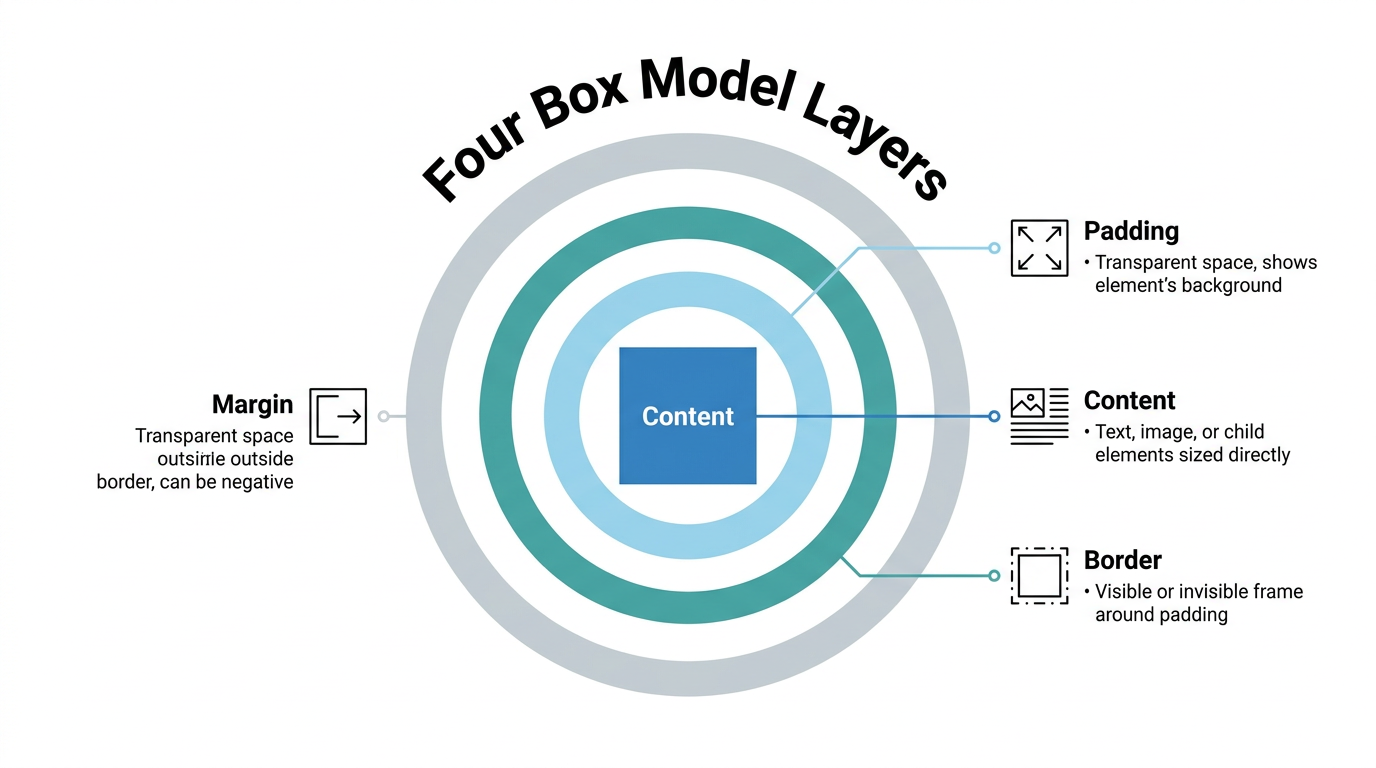
    Content, padding, border, and margin explained

    Diagram of content padding border and margin layers

    Think of the box model like a framed photograph on a wall. The photo itself is the content, the matting around it is the padding, the frame is the border, and the wall space keeping frames apart is the margin. Each layer has its own job, and CSS gives you separate properties to control every side of every layer.

    • Content is the text, image, or child elements you size directly with width and height.

    • Padding is transparent space between content and border; it can never go negative and always shows the element’s own background.

    • Border wraps around the padding as a visible or invisible frame and adds directly to the total size.

    • Margin is transparent space outside the border, can be negative, and controls the gap between separate elements.

    How do you calculate an element’s total width and height?

    Calculating total width and height means adding an element’s padding and border on top of its content size, at least under the default sizing rules. The formula works the same way for both dimensions: start with the value you set, then add the padding and border on both sides of that axis. Margin never enters this math because it sits outside the border and only affects spacing between elements, not the box’s own footprint. That’s why two elements with identical width values can look like different sizes once padding or borders differ.

    Formula and worked example

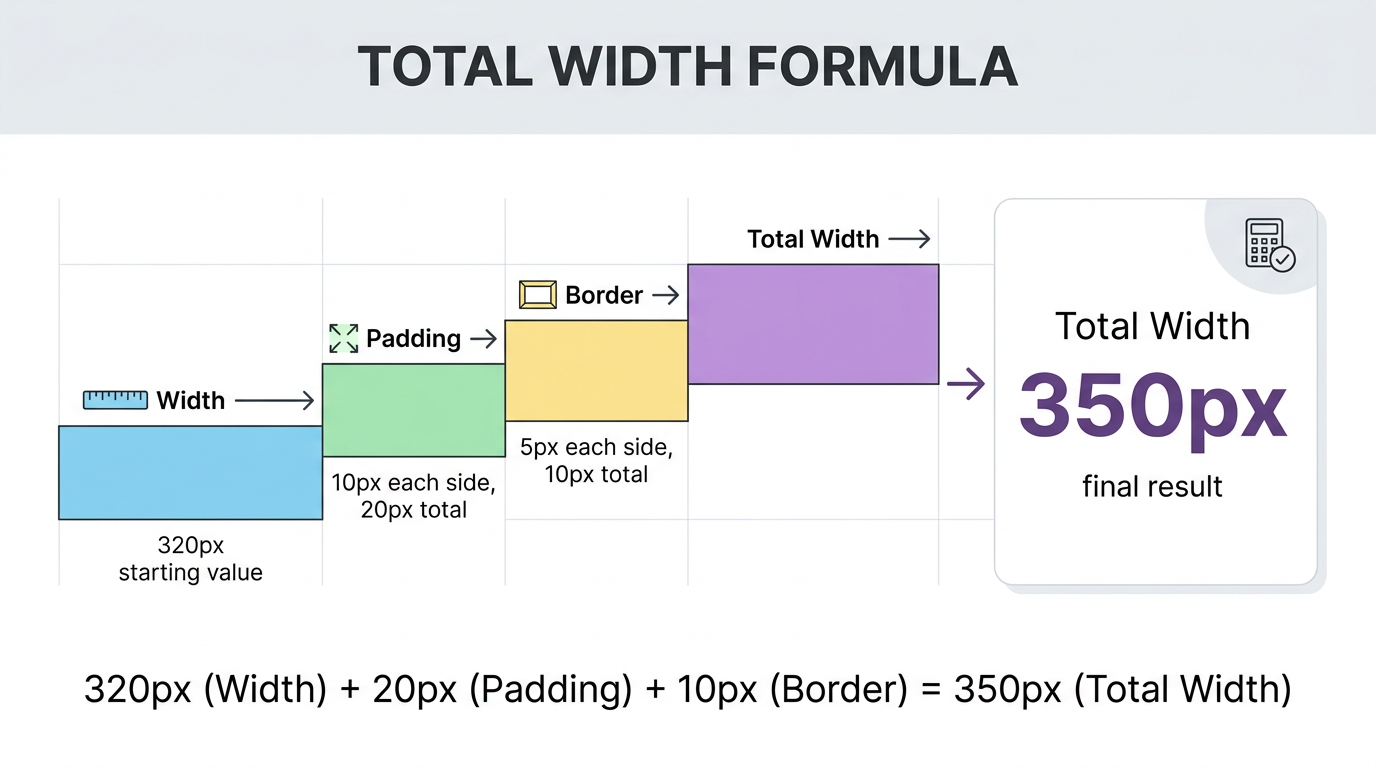
    Infographic showing box model width calculation formula

    The formulas are simple once written out.

    Total width = width + left padding + right padding + left border + right border
    Total height = height + top padding + bottom padding + top border + bottom border
    

    Say you set width: 320px, height: 50px, padding: 10px on every side, and a 5px solid border. Total width comes out to 320px plus 20px of combined padding plus 10px of combined border, landing at 350px. Height follows the same pattern, reaching 80px. Margin plays no part in either number; it only decides how far this box sits from whatever comes next.

    What’s the difference between content-box and border-box?

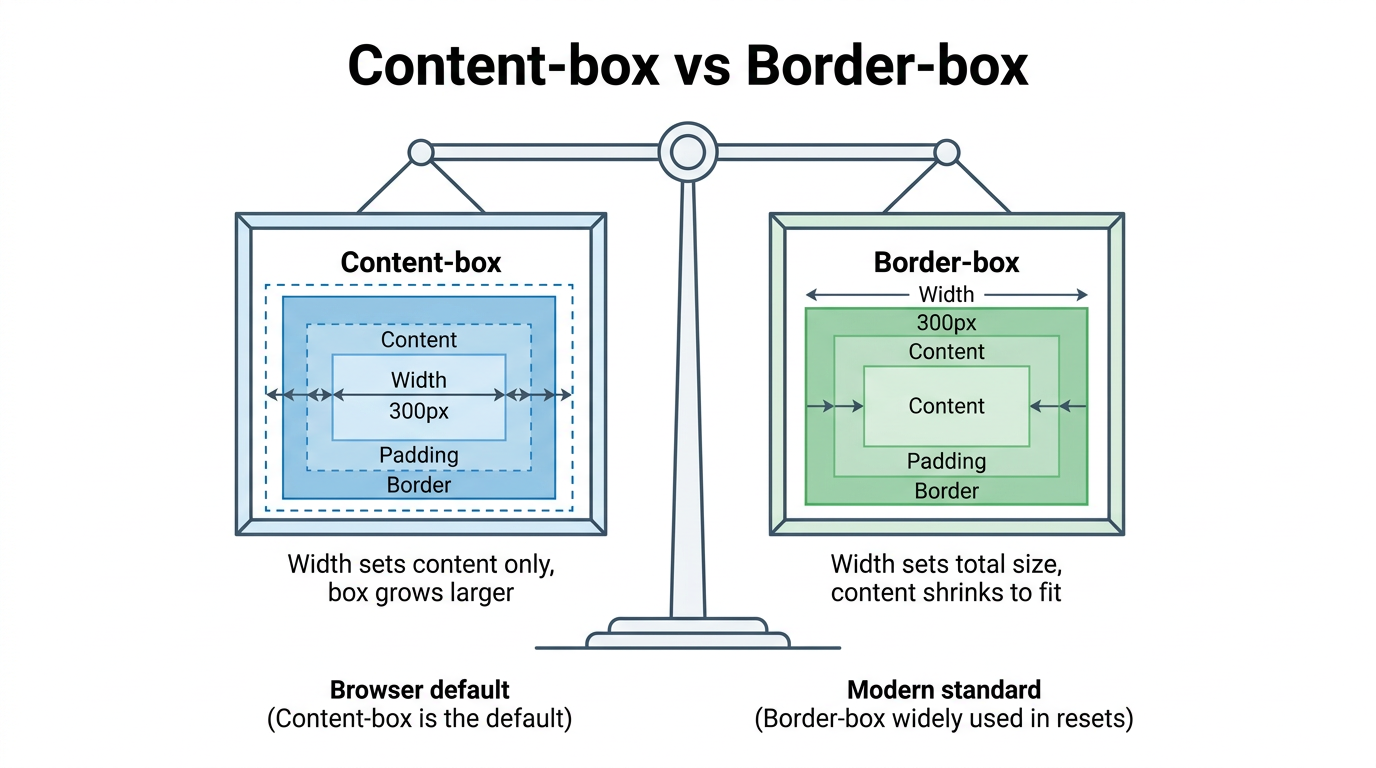
    Comparison chart of content box and border box sizing

    The difference between content-box and border-box comes down to what width and height actually measure. With content-box, the browser default, those properties set only the content area, then padding and border are added on top, growing the element beyond the number you typed. With border-box, the same properties set the total visible size, and the browser shrinks the content area internally to make room for padding and border instead. Both produce a real box, but they answer a different question about what “size” means, a distinction actively refined in the current CSS Box Model Module Level 4 draft, and most modern style sheets default to border-box specifically to avoid that confusion.

    Standard box model: content-box

    Under content-box, a div with width: 200px, 20px of padding per side, and a 2px border renders at 244px wide, not 200px. That’s the content plus 40px of combined padding plus 4px of combined border. Beginners often expect the width value to be the finished size, so this default is a frequent source of overflow bugs.

    Alternative box model: border-box

    Apply box-sizing: border-box to that same element and the total width stays locked at exactly 200px, with the content area shrinking to fit inside it. Many teams apply this globally with a short reset.

    html { box-sizing: border-box; }*, *::before, *::after { box-sizing: inherit; }
    What it measurescontent-boxborder-box
    width/height apply toContent onlyWhole visible box
    Padding and borderAdded on topIncluded inside
    Browser defaultYesNo

    How does the box model differ for block, inline, and inline-block elements?

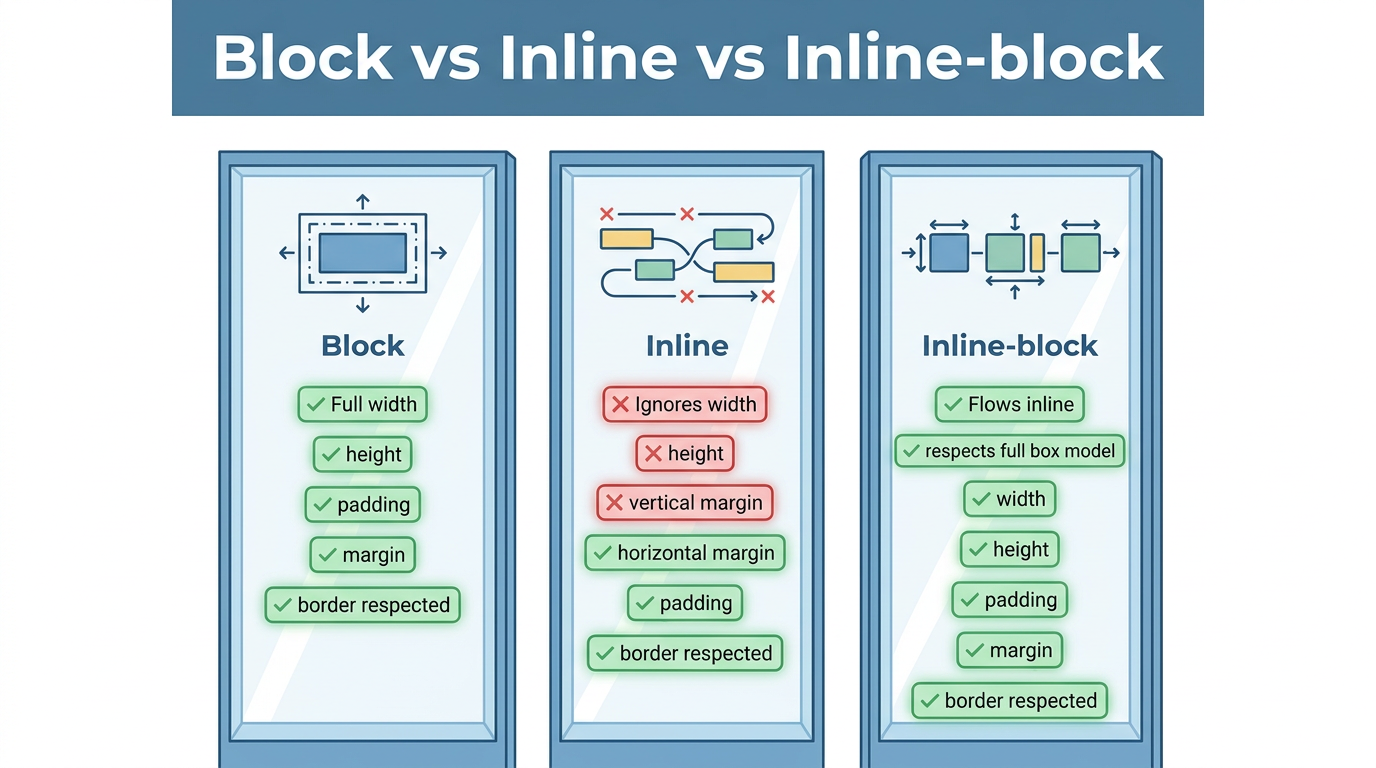
    Comparison of block inline and inline block elements

    Block, inline, and inline-block elements each apply the box model in their own way, which explains why the same property can behave differently depending on what you target. Block-level elements, like <div> and <p>, respect width, height, padding, margin, and border in full, and each one starts on a new line. Inline elements, like <span> and <a>, ignore width and height entirely and let vertical padding overlap surrounding lines rather than pushing them away. Inline-block borrows from both, flowing inline while still respecting every box model property.

    Block boxes vs. inline boxes

    A block-level element always starts on a new line and stretches to fill 100% of its parent’s width unless you set a narrower value. Padding, border, and margin on a block element push surrounding content away on every side, exactly as the box model suggests.

    An inline element flows within surrounding text instead of breaking onto its own line. Width and height have no effect, top and bottom margins are ignored, and top and bottom padding or border render visually but don’t push other lines away.

    When to use inline-block

    display: inline-block fixes cases where you want an element inline with text but still need control over its size. A common example is a navigation link inside an <li>, where inline-block lets you add padding for a larger click target without breaking the row onto separate lines.

    • Plain inline ignores width, height, and vertical margin, and can overlap padding vertically.

    • Inline-block respects width, height, and padding or margin on every side, while still sitting inline.

    Why do margins sometimes collapse?

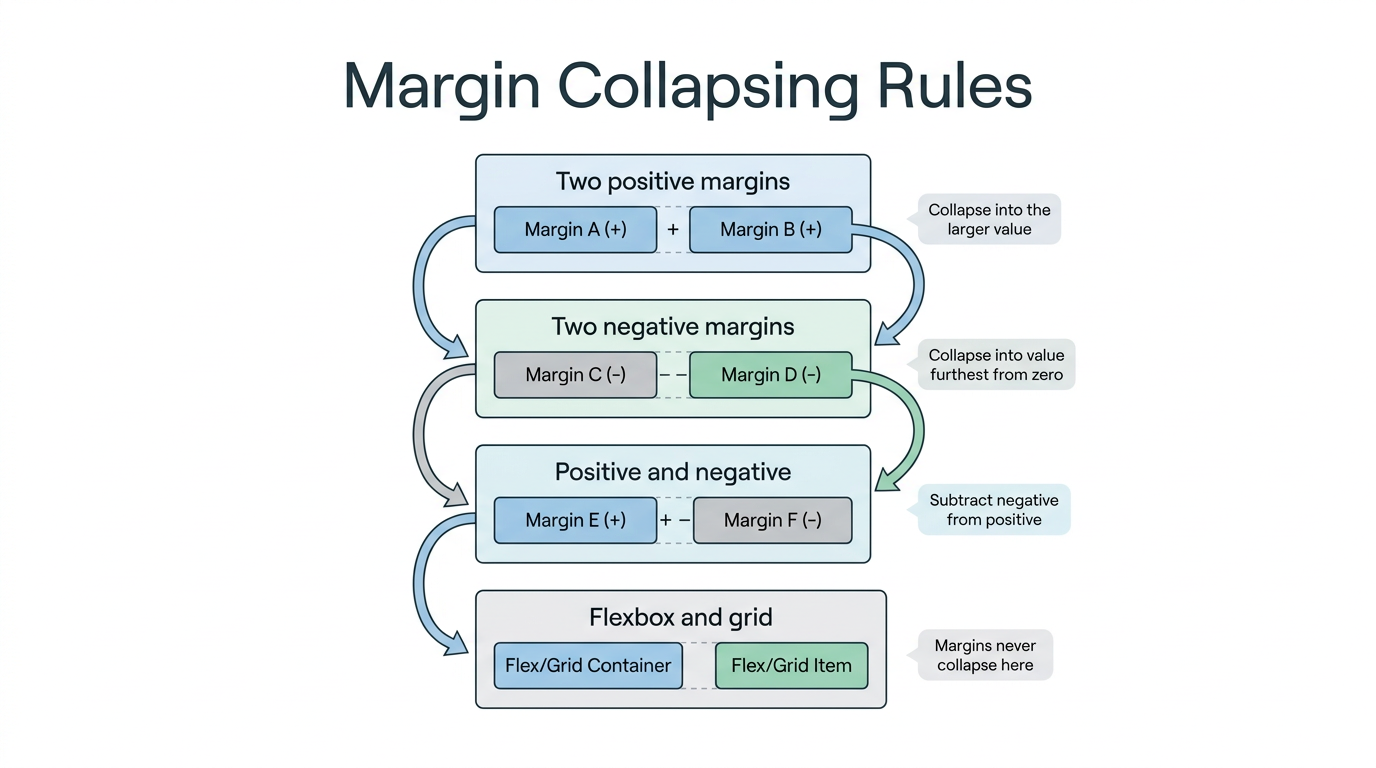
    Margin collapsing happens when the vertical margins of two block-level elements touch and merge into one margin instead of adding together. This only affects top and bottom margins between elements in normal document flow, a scenario developers frequently troubleshoot in threads like width of child element overriding constraints, and it never touches padding, borders, or horizontal margins. The behavior catches developers off guard because the visible gap between stacked elements often ends up smaller than the sum of their margins would suggest.

    Rules and a quick example

    Diagram explaining margin collapsing rules in CSS

    The rules are simple once you know them.

    • Two positive margins meeting each other collapse into a single margin equal to the larger value, not their sum.

    • Two negative margins collapse into the value furthest from zero.

    • A positive and a negative margin combine by subtracting the negative value from the positive one.

    Picture a paragraph with margin-bottom: 50px above one with margin-top: 30px. The visible gap ends up at 50px, not 80px, because the larger value wins. This behavior never happens inside flexbox or grid containers, where every margin is honored in full.

    Tip: if a gap between two stacked elements looks smaller than expected, check for margin collapsing before assuming your CSS has a typo.

    Simplify your CSS workflow with Tools Repository

    Once you understand how padding, border, and margin stack up, testing those values by hand can still slow you down, especially while experimenting with a new layout. Tools Repository offers free CSS generators and layout helpers that let you adjust padding, border, and sizing values and watch the resulting box update instantly, without writing a single rule from scratch. It’s a quick way to check how content-box and border-box math will actually render before committing changes to a live project.

    Every tool on the platform runs directly in your browser, so nothing you type is stored, tracked, or sent anywhere. There’s no login, no installation, and no subscription involved, making it a practical option for students learning the box model or freelancers checking a client’s layout on the fly.

    The takeaway

    The CSS box model sits underneath every layout decision you’ll ever make, from spacing a single button to structuring a full-page grid. Once you can picture content, padding, border, and margin as nested layers, sizing bugs stop feeling random and start making sense, whether you’re troubleshooting an overflowing container or a link that won’t accept a width.

    Make border-box your default, lean on browser DevTools whenever a size looks off, and keep the margin collapsing rules in mind before second-guessing your CSS. When you want to test padding, border, or sizing changes without touching a stylesheet, Tools Repository’s free, no-login CSS tools are built for exactly that kind of quick, private experimentation.

    Frequently asked questions

    Does padding or margin affect an element’s background color?

    Padding affects how much of an element’s background is visible, since it sits inside the border and shares the same background color or image as the content. Margin never does this. It’s transparent space outside the border, so it always shows whatever sits behind the element instead.
    Can I use browser DevTools to see the box model?

    Yes, Chrome, Firefox, Edge, and Safari all include a visual box model diagram in their developer tools inspector. Select any element and you’ll see a color-coded set of nested boxes with exact pixel values for its content, padding, border, and margin, which makes debugging unexpected sizing far quicker.

    Why doesn’t setting a width work on my span element?

    A <span> is an inline element by default, and inline elements ignore width and height entirely, along with top and bottom margins. If you need to size it directly, switch its display value to inline-block or block, both of which respect the full box model.

    Should I always use border-box for every project?

    Not strictly, but most developers apply border-box globally because it makes sizing predictable, especially in responsive layouts built with percentages. It isn’t mandatory, and content-box still has valid uses, but border-box removes most of the sizing surprises that come from adding padding to a fixed-width element.
  • What Is a Simple Interest Formula? (I = Prt Explained)

    What Is a Simple Interest Formula? (I = Prt Explained)

    Trying to figure out how much interest a loan or savings account will really cost or earn can feel confusing, especially when every bank and calculator seems to use different numbers. Interest math doesn’t have to be complicated. So what is a simple interest formula? It’s a plain equation, written as I = Prt, that calculates interest based only on your original principal amount, with no compounding involved at all.

    Many people mix up simple interest with compound interest, or don’t know how to plug real numbers into the equation. That confusion can lead to bad assumptions about what a loan actually costs or what a deposit will actually earn over time.

    This guide breaks the simple interest formula down in plain language, then walks through real examples using loans and savings accounts. You’ll see how to rearrange the formula to solve for principal or time, how simple interest stacks up against compound interest, and where you’re likely to run into it in everyday finance. We’ll also show you how a free tool from Tools Repository can check your math in seconds.

    Key takeaways

    • The simple interest formula is I = P × r × t, where P is the principal, r is the annual rate, and t is time in years.

    • To find the full balance rather than just the interest, use A = P(1 + rt).

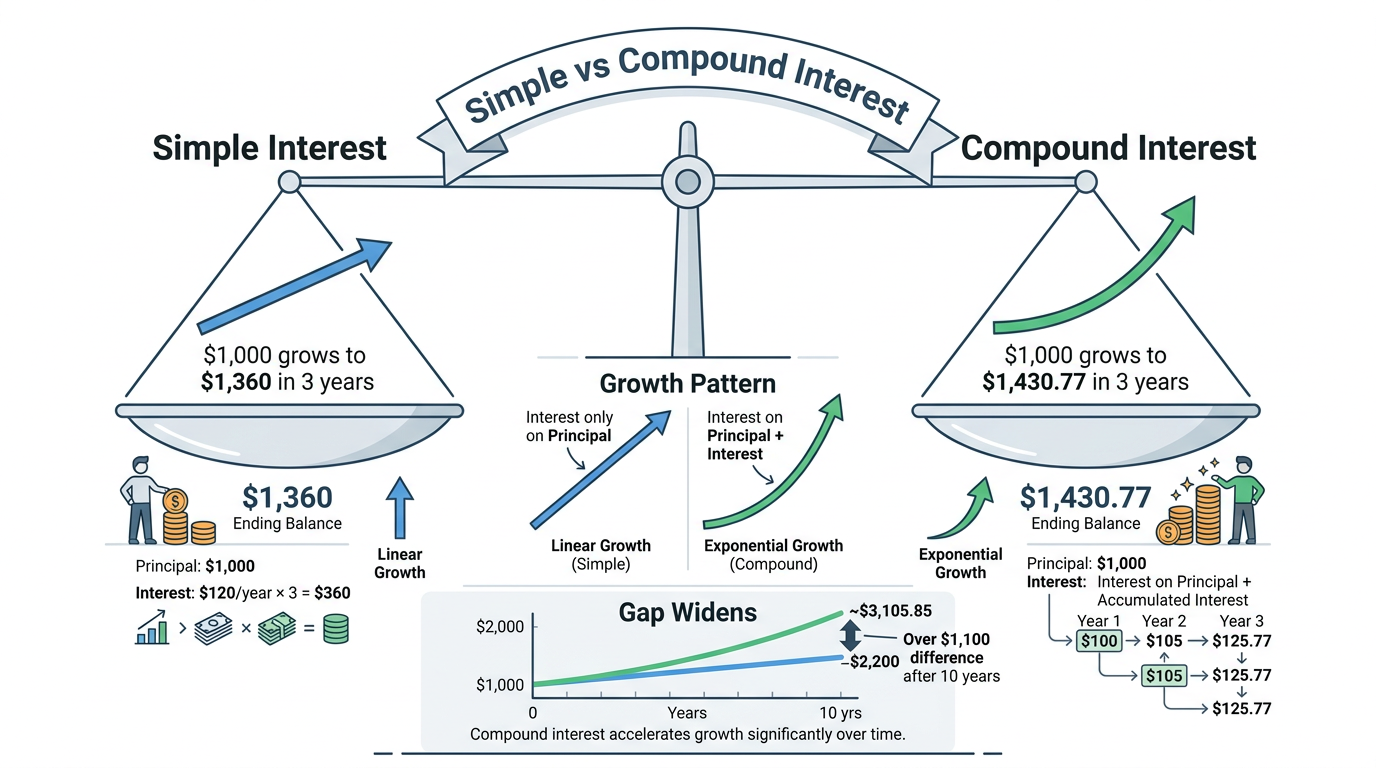
    • Simple interest grows in a straight line, unlike compound interest, which accelerates over time.

    • Auto loans, student loans, short-term personal loans, and many mortgages calculate interest this way.

    • You can rearrange the formula to solve for principal or time when planning a savings goal or loan payoff.

    Table of Contents

    What is the simple interest formula?

    Diagram breaking down the simple interest formula components

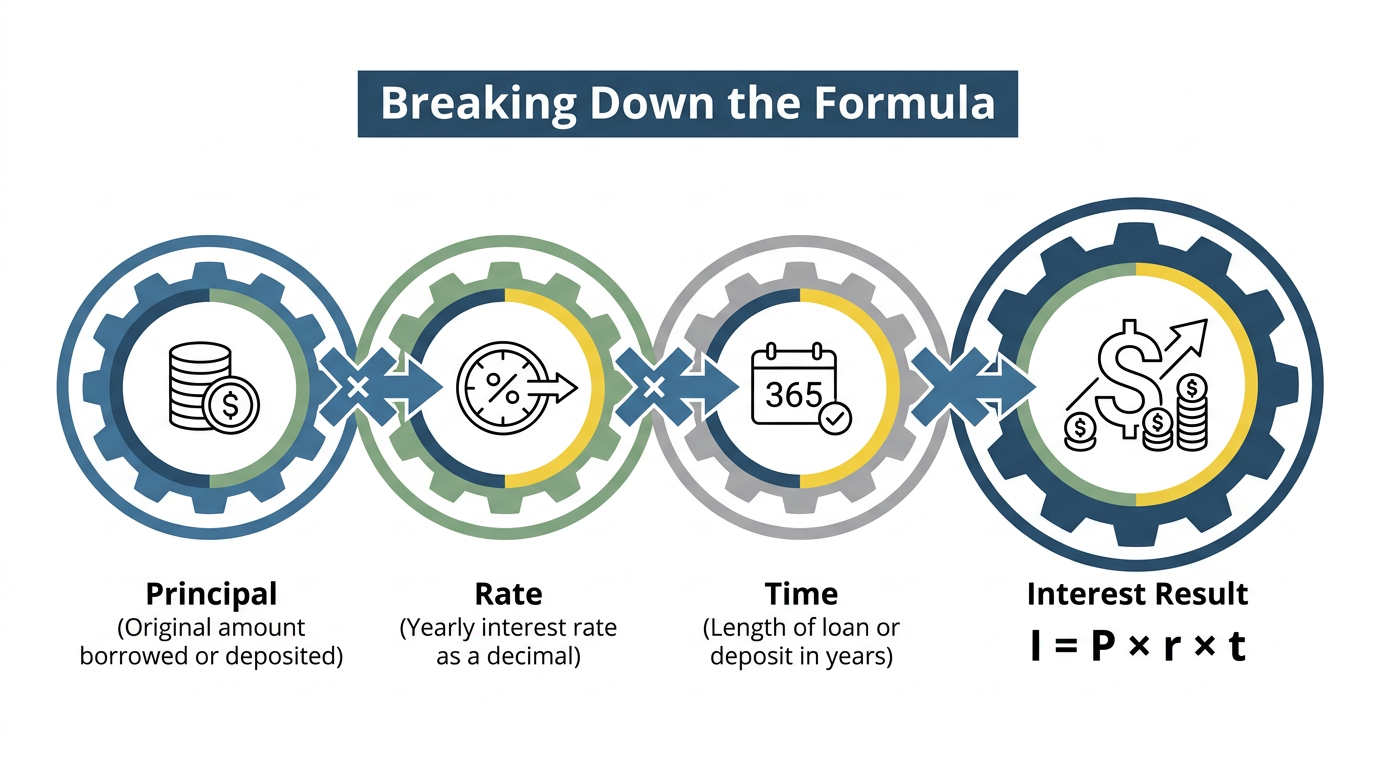
    The simple interest formula is I = P × r × t, a calculation that finds interest owed or earned using only the original principal, never any interest that built up before it. This is what makes simple interest so predictable compared to other interest calculations. In the formula, I stands for the interest amount, P stands for principal, r stands for the yearly interest rate written as a decimal, and t stands for the time period, usually measured in years. Because none of these variables change mid-calculation based on prior interest, the math stays simple enough to do on paper or in your head, which is exactly why so many everyday loans and short-term deposits still rely on it.

    Breaking down P, r, and t

    Each letter in the formula stands for something concrete you can pull straight from a loan agreement or account statement:

    • P is the principal, the actual dollar amount borrowed or deposited before any interest gets added.

    • r is the yearly percentage rate converted into a decimal, so 6% becomes 0.06 in the equation.

    • t is the length of the loan or deposit in years, though it can be written as a fraction, like 0.5 for six months.

    Finding the total amount owed or earned

    Knowing the interest alone only tells half the story, so most people also want the total amount, labeled A, sitting in an account or owed on a loan. That total comes from adding interest back to the principal, A = P + I, which simplifies to A = P(1 + rt) once you substitute in the original formula. This version saves a step whenever you need the final balance directly, rather than calculating interest first and adding it separately afterward.

    How do you calculate simple interest step by step?

    Step-by-step chart of simple interest calculation examples

    Calculating simple interest step by step means plugging your principal, rate, and time straight into I = Prt, a method outlined in detail in this simple interest applications guide, then adding that result back to the principal if you need the full balance. The process stays the same whether you’re checking a savings account, a car loan, or a student loan repayment, which is part of what makes this formula so approachable for anyone without a finance background. Once you see a few worked examples side by side, the pattern becomes obvious, and you’ll be able to run your own numbers on any loan offer or deposit account within a minute or two.

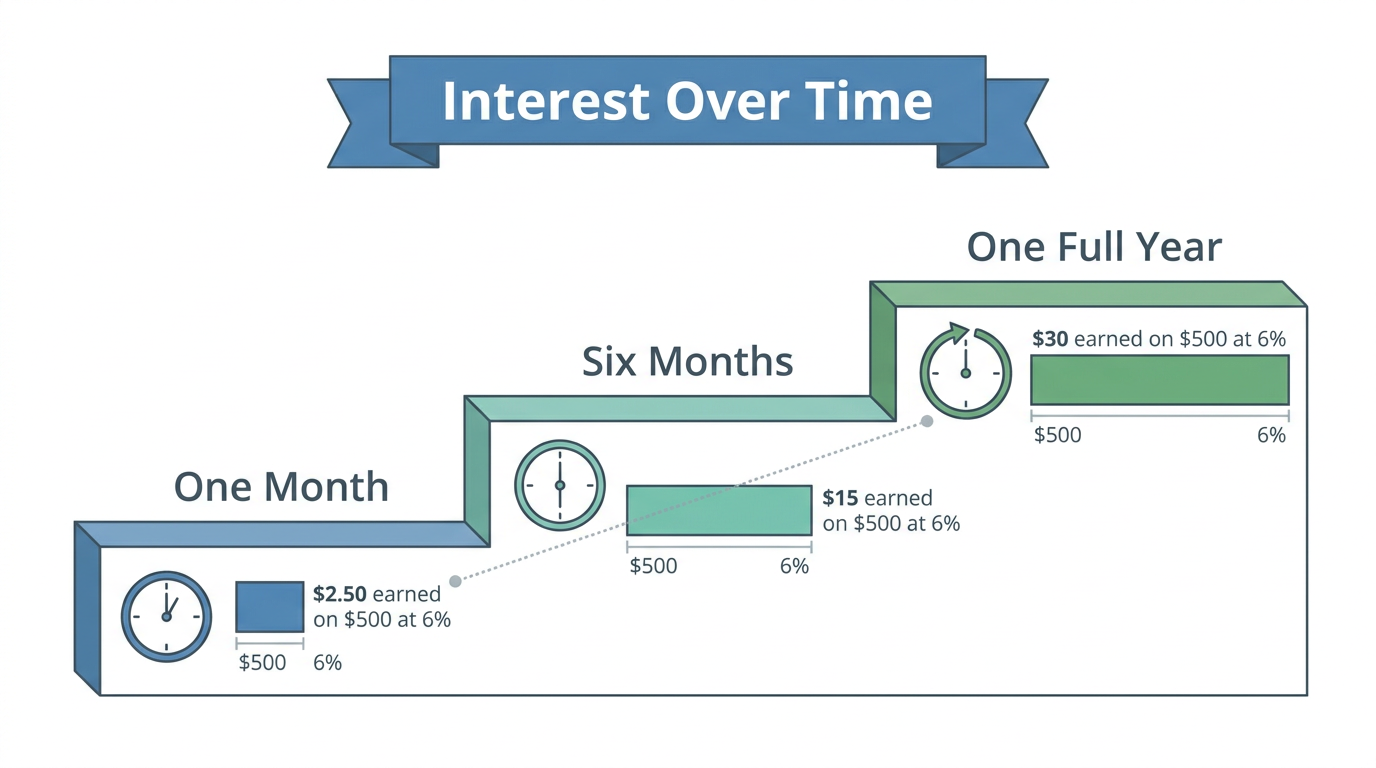
    Example: Interest over different time periods

    Say you invest $500 at a 6% simple interest rate.

    • Over one month: I = (500)(0.06)(1/12) = $2.50

    • Over six months: I = (500)(0.06)(6/12) = $15

    • Over a full year: I = (500)(0.06)(1) = $30

    This shows how interest grows in a straight, proportional line as time passes.

    Example: Savings account and loan repayment

    Suppose someone deposits $200 into a savings account at a 12% simple interest rate. Using I = Prt, that’s I = (0.12)(200)(1), or $24 in interest for the year. Add that to the principal and the account holds $224 by year’s end, a quick example of A = P(1 + rt) in action.

    Now picture an $18,000 student loan carrying a 6% rate over a three-year term. The interest comes out to I = $18,000 × 0.06 × 3, or $3,240. Combined with the original principal, the borrower owes $21,240 by the time the loan term ends.

    Solving for principal or time

    The same formula rearranges easily whenever you know the total amount but need to find principal or time instead.

    • To solve for principal, use P = A / (1 + rt), which tells you how much to deposit today to hit a future savings goal.

    • To solve for time, use t = ((A/P) − 1) / r, which is handy for figuring out how many years it will take an investment or loan to reach a specific balance.

    Simple interest vs. compound interest: what’s the real difference?

    Comparison chart of simple versus compound interest

    The real difference between simple interest and compound interest comes down to whether interest is charged only on the original principal or on principal plus previously earned interest. Simple interest keeps the calculation flat and predictable, since the same principal gets used every single period. Compound interest, on the other hand, adds each period’s interest back into the balance, so future interest calculations grow from a larger number every time, creating what’s often called a snowball effect. Consider Sally and Ann, who each invest $1,000 at 12% for three years. Sally, earning simple interest, ends up with $1,360, while Ann, earning interest compounded monthly, ends up with $1,430.77, a $70.77 gap that widens to over $1,100 after ten years.

    Comparison table: simple vs. compound

    The table below lays out the practical differences side by side so you can see at a glance which method applies to your situation.

    FeatureSimple interestCompound interest
    Calculation basisOriginal principal onlyPrincipal plus prior interest
    Growth patternLinear, constant rateExponential, accelerating rate
    Typical productsAuto loans, student loansSavings accounts, credit cards
    Who benefits mostBorrowers pay lessSavers earn more

    Where is simple interest used in everyday finance?

    Couple reviewing auto loan and mortgage paperwork together

    Simple interest shows up across several common financial products that most people encounter at some point. Auto loans, short-term personal loans, many student loans, and a good number of mortgages all calculate interest this way, which is part of why the formula is worth knowing even if you never touch a spreadsheet.

    One practical upside is that borrowers can often reduce total interest owed by paying extra toward the principal balance. Since interest is calculated fresh each period based only on the outstanding principal, a smaller balance means smaller future interest charges, and strategies like biweekly mortgage payments can shave real money off a loan over its full term.

    Skip the manual math with a free calculator

    Person calculating loan interest using online calculator

    Running the simple interest formula by hand works fine for a single loan or deposit, but checking several scenarios quickly gets tedious. Tools Repository offers a browser-based calculator built for exactly this kind of quick math, letting you plug in principal, rate, and time to see interest and total balance instantly without opening a spreadsheet.

    Since the tool runs entirely in your browser, none of your numbers get sent anywhere or stored on a server. There’s no sign-up, no subscription, and no cost involved, which fits well for students comparing loan offers or freelancers checking a client payment plan on the fly.

    The takeaway

    Two formulas do almost all the work here. I = Prt gives you the interest earned or owed, and A = P(1 + rt) gives you the full balance once that interest gets added back to the principal. Both stay simple because the principal used in the math never changes, no matter how many periods pass.

    Whether you’re comparing an auto loan, sizing up a student loan repayment, or projecting a savings account balance, these two equations cover most of what you’ll ever need. If you’d rather skip the manual plugging and checking, a free calculator like the one on Tools Repository can confirm your numbers in seconds, no strings attached.

    Frequently asked questions

    Question: What is the difference between simple interest and daily simple interest?
    Daily simple interest accrues every single day based on the current outstanding balance, rather than being calculated only up to a fixed due date. The balance also drops on the exact day a payment is received, not on a scheduled date, which matters for early or late payments.

    Question: Do mortgages use simple interest or compound interest?
    Most amortized mortgages in the U.S. technically use simple interest calculations. They can still feel like compound interest, though, since falling principal balances let more of each payment go toward principal over time, creating a similar snowball effect on paydown speed.

    Question: How do I lower the total interest I pay on a simple interest loan?
    Making extra payments directly toward the principal is the most reliable way to cut total interest owed. Since interest recalculates from the current balance each period, a smaller principal immediately reduces future charges, and switching to biweekly payments can shorten the loan term further.

    Question: Can the simple interest formula be used for savings accounts?
    Yes, some savings accounts and certificates of deposit pay simple interest rather than compound interest. The same formula, I = Prt, applies whether the money is being borrowed or deposited, so the math works identically in both directions.

    Question: What happens if I make a partial payment on a simple interest loan?
    A partial payment is applied to any interest that has already accrued first, before touching the principal balance. Only the amount left over after covering that accrued interest goes toward reducing what you actually owe on the loan.